
Best Search Skills for OpenClaw in 2026
Tested March 2026 · 35 runs · 5 research scenarios · 6 skills compared

Search is the first skill anyone installs in OpenClaw - it’s what lets your agent look beyond the model’s knowledge cutoff and engage with the world as it is today. ClawhHub hosts dozens of community-built search skills, each wrapping a different underlying search service. We picked the top ones by downloads and community attention, ran them through a structured benchmark, and ranked them so you know exactly which to install.
Tested March 2026 · 35 runs · 5 research scenarios · 6 skills compared
Why Search Is OpenClaw’s Most Essential Skill
OpenClaw is your personal AI assistant, running on your own devices and available on every channel you already use. Of all the skills in its library, Search is the one the official onboarding guide flags as a recommended first install. The reason is simple: without it, OpenClaw can only draw on what its underlying model was trained on - which has a cutoff date, and which knows nothing about what happened last week, last month, or in your specific domain.
Search unlocks the full range of tasks that actually matter day-to-day. Need to know the latest funding rounds in a space you’re tracking? Trying to understand how competitors are positioning? Following a regulatory case in real time? Researching a technical problem and looking for solutions others have already documented? Even when you give OpenClaw a completely new task, it will often need to search first - to find the right approach, the right library, the right precedent - before it can act. That’s why Search is foundational rather than optional: it’s the prerequisite for almost everything else.
A search skill packages two primitives:
Search - finds the right URLs: submits a query and returns a ranked list of results with titles, snippets, and links. Quality here is about accuracy and coverage - surfacing the most relevant sources without missing important ones.
Fetch - pulls the actual content: given a URL, retrieves the full text efficiently and reliably. Raw HTML, paywalls, and redirects are handled so the model gets clean, usable text rather than noise.
Together, these two cover the core research loop for nearly every nontrivial agent task. Which is why there are dozens of search-related skills on ClawhHub alone - each one wrapping a different underlying search service, with different implementation choices, result formats, and levels of optimisation for agent use. For this benchmark we selected the most-downloaded and most-watched skills to make the comparison as useful as possible.
The benchmark covers 6 community-built skills from ClawhHub plus a baseline (Anthropic’s built-in WebSearch, available in Claude Code but not in OpenClaw or other agents not using the Anthropic model). We ran each skill across 5 research scenarios - AI company funding, quantum computing, climate tech, tech regulation, and humanoid robotics - all requiring live 2025-2026 data that no model could answer from training knowledge alone. The five scenarios cover the most common types of research tasks OpenClaw users run.
🦞 New to OpenClaw?
OpenClaw is a personal AI assistant you run on your own devices. It answers you on the channels you already use - WhatsApp, Telegram, Slack, Discord, Signal, iMessage, Teams, and many more. It can speak and listen on macOS, iOS, and Android, and render a live Canvas you control. Skills extend what it can do - and the community-maintained skill registry lives at clawhub.ai.📌 What we actually tested
Each entry is a skill + search service combination - for each service, we picked either its official skill on ClawhHub or the community skill with the highest download count. Even when two skills use the same underlying API, the implementation makes a real difference: it directly affects how efficiently results are structured for the model and what controls the agent can use. A poorly implemented skill wastes tokens; a well-built one does not.
Overall Rankings & Quick Picks
What We Measured - and the Surprise Finding
Content quality and reliability were table stakes: we ran automated checks to verify each output covered the right entities, data points, and timeframe, and audited every run to confirm the agent actually used the skill’s designated API rather than falling back to internal knowledge.
The surprise: reliability wasn’t the differentiator. Six of seven skills passed every content and audit check. The real story was agent token consumption - and the gap is enormous. Token usage directly determines how fast and cheap a task completes, because it reflects how efficiently the skill’s output is structured for model consumption. The best skill (Tavily) used 85% fewer agent tokens than the built-in baseline to produce equivalent results. That translates to faster runs, lower LLM costs, and less time waiting.
Note: “Cost” in our benchmark refers specifically to agent-side token consumption - the tokens your LLM burns reading and processing search results. This is what you pay for in API calls. The skill’s own API pricing (Tavily, Exa, etc.) is a separate cost, shown in each review below.
The Scorecard
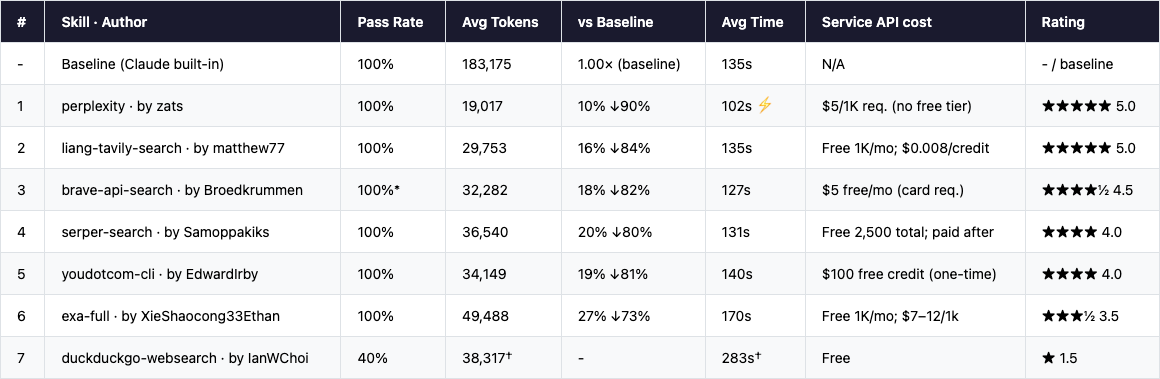
* Brave: 1 run misclassified by a check-script bug; actual pass rate 5/5. † DuckDuckGo: 3/5 runs timed out at startup (0 tokens). Metrics shown are averages of the 2 successful runs only. Token costs estimated at Opus pricing ($15/M input + $75/M output); external skill API fees are not included.
Quick Picks
Know what you need? Skip straight to the recommendation.
🏆 Best overall choice
liang-tavily-search (Tavily)
by matthew77 · clawhub.ai/matthew77/liang-tavily-search
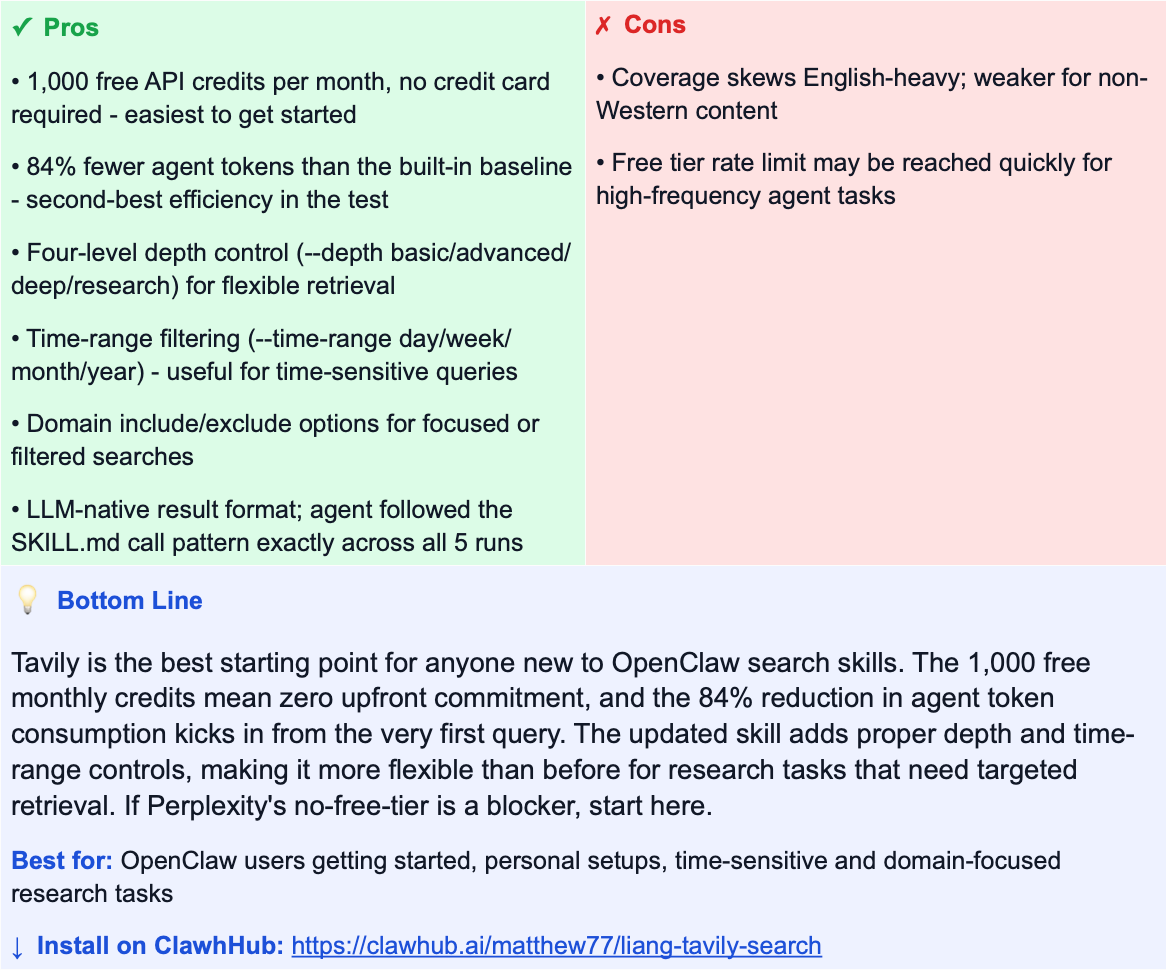
1,000 free credits per month, no credit card required - the easiest way to get started with search in OpenClaw. Performance is excellent (84% fewer agent tokens than the baseline), and the LLM-native result format means your agent processes results efficiently from the first query. Start here.⚡ Best raw performance (paid)
perplexity (Perplexity AI)
by zats · clawhub.ai/zats/perplexity
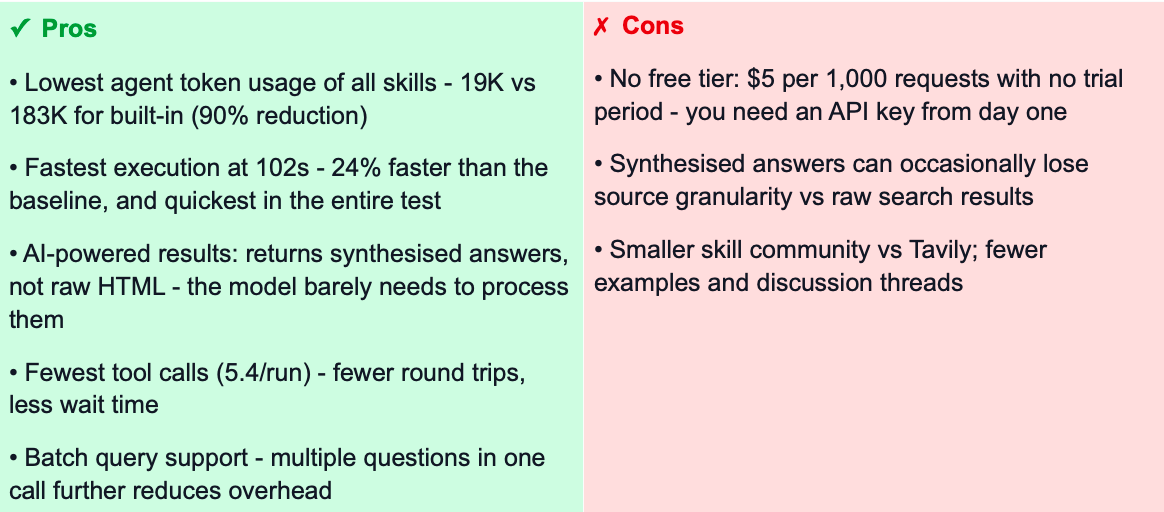
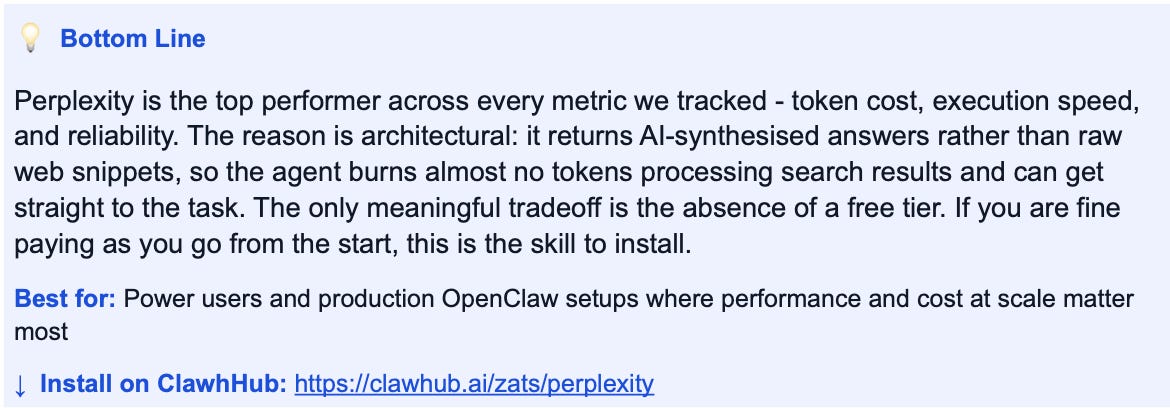
Fastest and most token-efficient option if you are happy to pay from day one. Wins every metric - 90% fewer agent tokens, fastest execution at 102s, fewest tool calls. Returns AI-synthesised answers rather than raw web snippets. No free tier: $5 per 1,000 requests.🔒 Privacy-first / no data logging
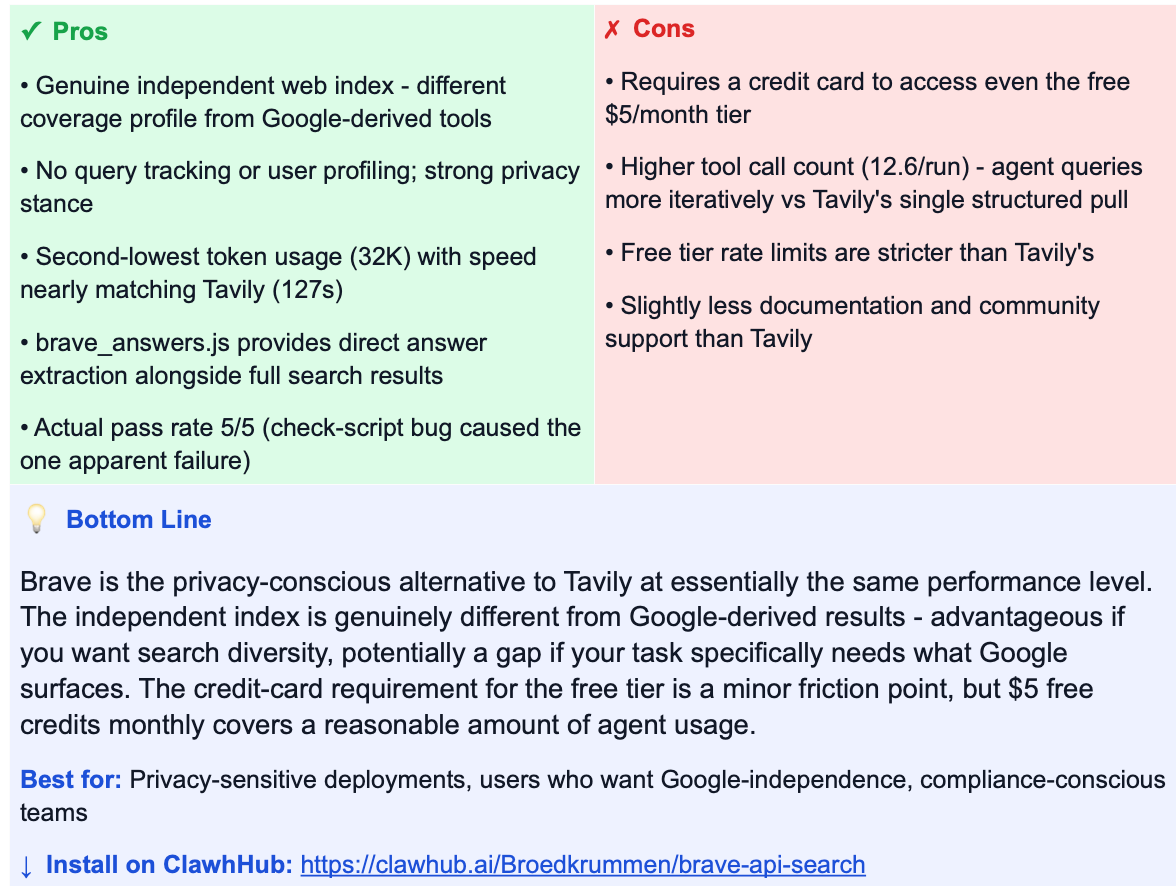
brave-api-search (Brave Search)
by Broedkrummen · clawhub.ai/Broedkrummen/brave-api-search
Brave’s API doesn’t track or profile queries, runs on a genuinely independent web index, and performance nearly matches Tavily. Requires a credit card for the free $5/month tier.🔍 Google-quality results specifically
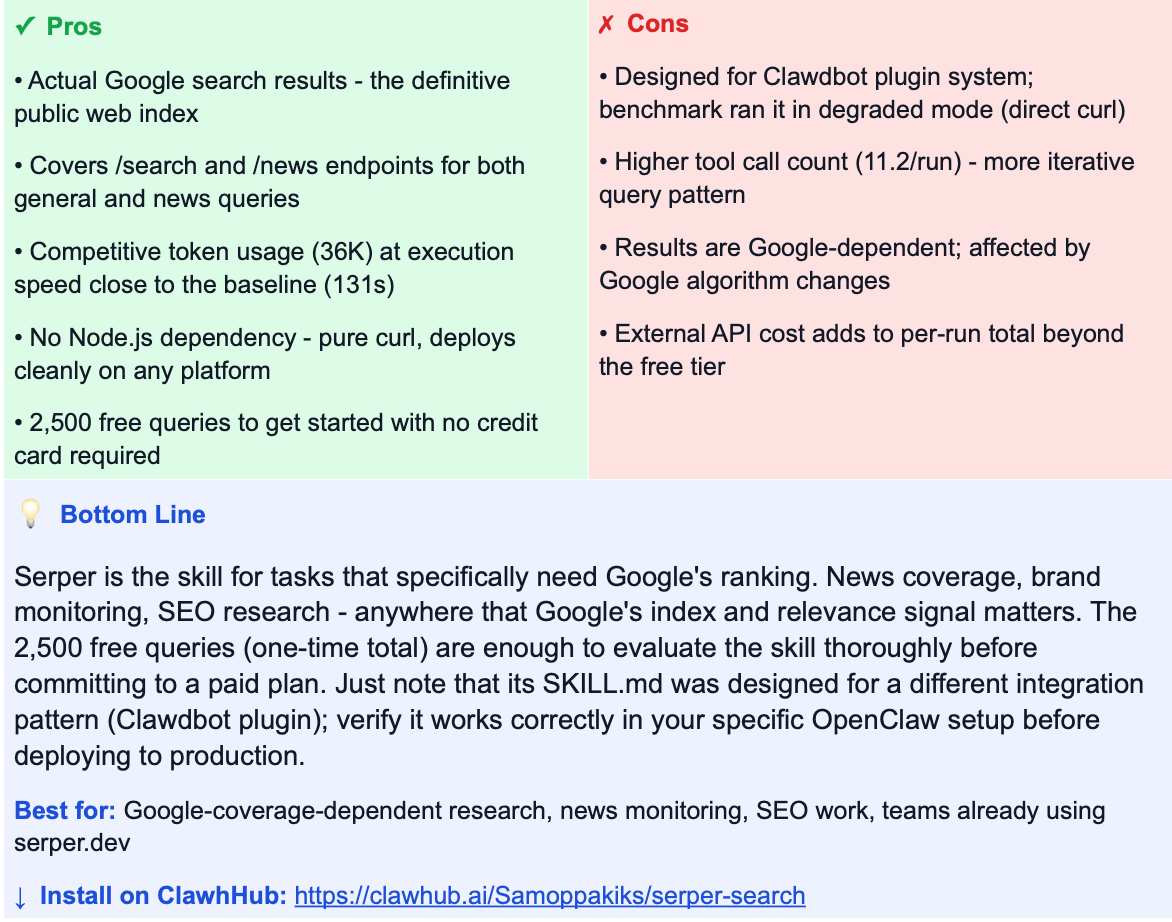
serper-search (Serper / Google)
by Samoppakiks · clawhub.ai/Samoppakiks/serper-search
Proxies real Google SERPs via serper.dev. If your task requires Google’s ranking and coverage - brand monitoring, SEO research, news - this is the right pick. 2,500 free queries total to get started, no credit card needed.
Detailed Reviews
Each entry below is a specific skill package on ClawhHub - author, install link, and benchmark results. The service name is shown for quick orientation, but what we tested is the skill implementation, not the underlying API.
The Baseline: Anthropic Built-in WebSearch
Claude Code has native WebSearch + WebFetch built in, powered by Anthropic’s model capabilities. This is our benchmark baseline - the quality reference everything else is measured against. It’s genuinely good: thorough reports, correct tool use, 100% pass rate.
The problem is token cost. At 183,175 average tokens per run, the built-in search is expensive. It iterates heavily - WebSearch -> WebFetch -> WebSearch chains accumulate context fast. This capability is also not available in OpenClaw or other agents not using the Anthropic model, which is the core reason third-party search skills exist. The numbers below show how much ground the third-party options cover.
#1
perplexity (Perplexity AI Search API)
by zats · clawhub.ai/zats/perplexity
AI-synthesised answers rather than raw web snippets - highest efficiency in the benchmark
★★★★★ 5/5

#2
liang-tavily-search (Tavily Search API)
by matthew77 · clawhub.ai/matthew77/liang-tavily-search
Best free-tier option - richer search controls with no credit card required
★★★★★ 5/5

#3
brave-api-search (Brave Search API)
by Broedkrummen · clawhub.ai/Broedkrummen/brave-api-search
Privacy-first independent index - not a Google reskin, actual crawl diversity
★★★★½ 4.5/5

#4
serper-search (Google SERP via serper.dev)
by Samoppakiks · clawhub.ai/Samoppakiks/serper-search
Real Google results via API - highest-fidelity index of the public web
★★★★☆ 4/5

#5
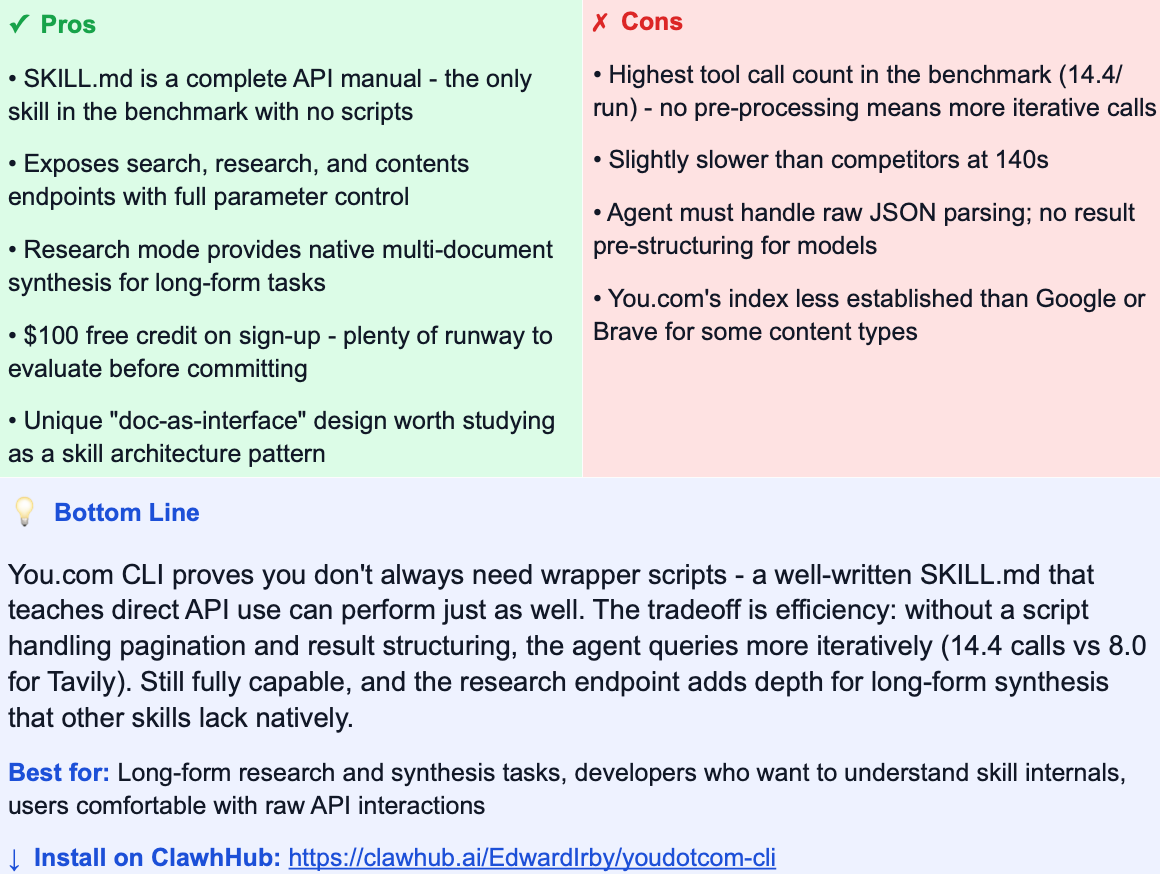
youdotcom-cli (You.com REST API)
by EdwardIrby · clawhub.ai/EdwardIrby/youdotcom-cli
“Doc-as-interface” design - the SKILL.md is a curl cheat sheet, no wrapper scripts
★★★★☆ 4/5

#6
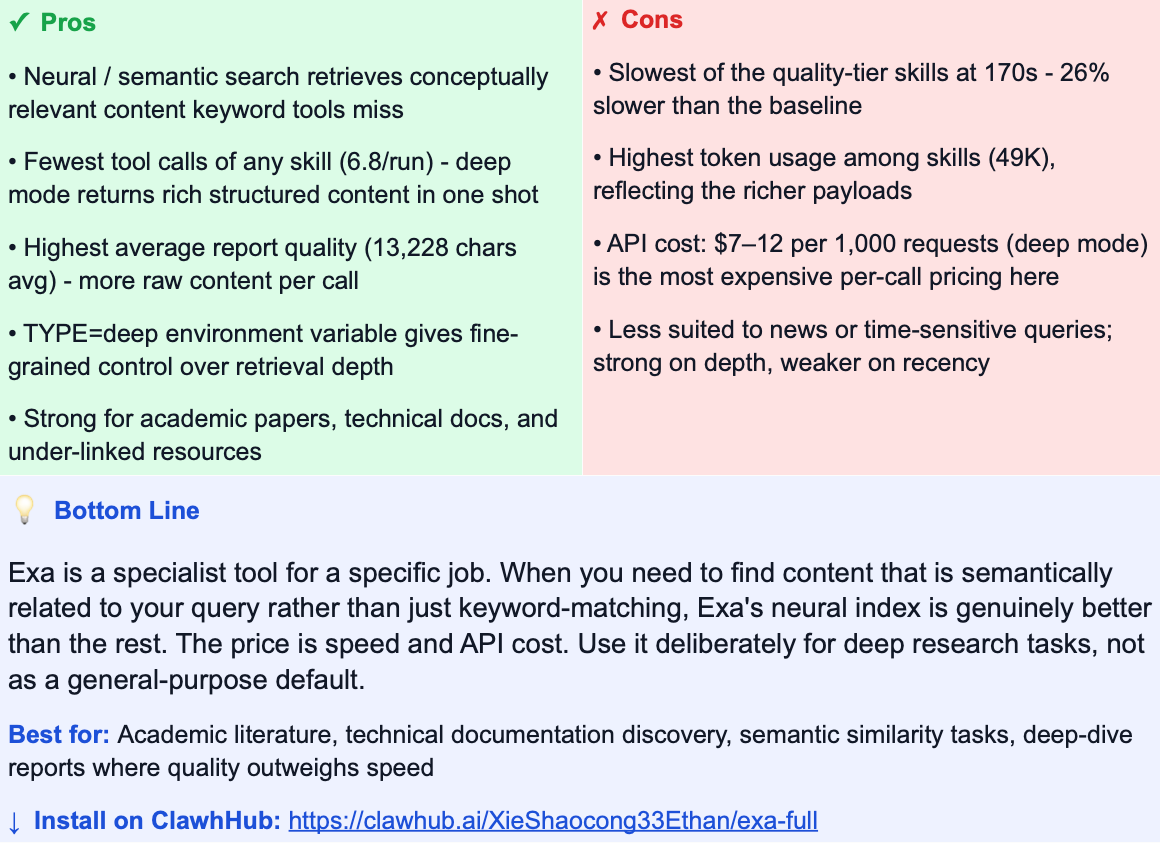
exa-full (Exa Search API (deep mode))
by XieShaocong33Ethan · clawhub.ai/XieShaocong33Ethan/exa-full
Neural semantic search - built for when keyword recall isn’t enough
★★★½☆ 3.5/5

#7
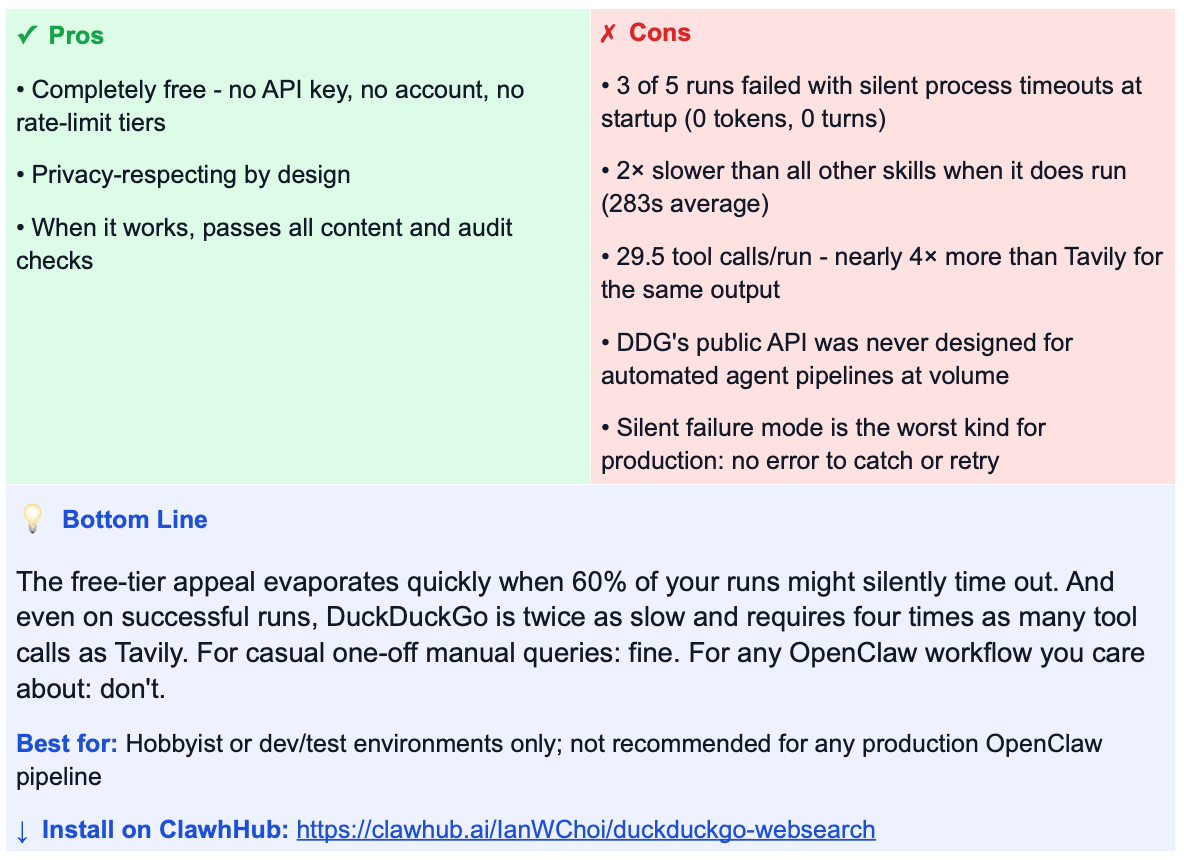
duckduckgo-websearch (DuckDuckGo Instant Answer API)
by IanWChoi · clawhub.ai/IanWChoi/duckduckgo-websearch
Zero API cost - but reliability makes it a non-starter for production agent pipelines
★½☆☆☆ 1.5/5

Test Methodology
Setup & Environment
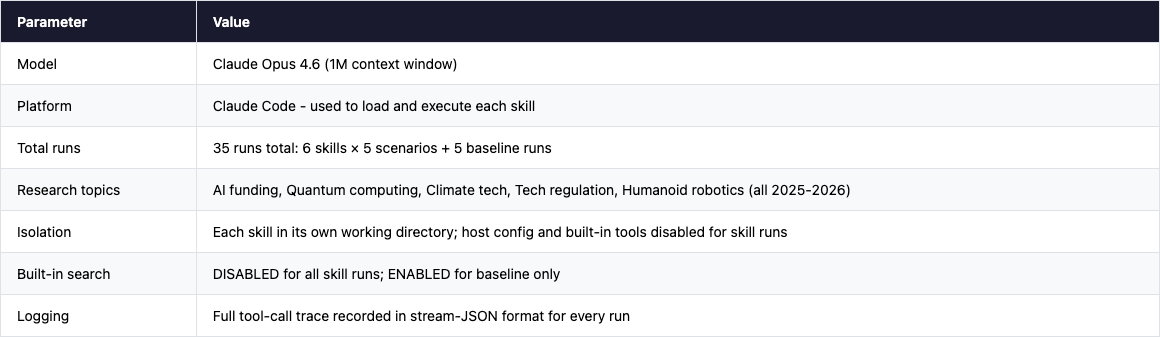
All tests ran on Claude Code with Claude Opus 4.6 (1M context window), using a single worker per skill run to prevent interference. Each skill was isolated in its own working directory with a clean environment - no shared state between runs.
Critical constraint: Anthropic’s built-in WebSearch and WebFetch tools were explicitly disabled (via --disallowedTools) for all skill runs. This forced the agent to use only the skill-provided search API. Without this constraint, the agent would fall back to the built-in search and the comparison would be meaningless. The baseline run is the only one that had built-in search enabled.
The Five Research Scenarios
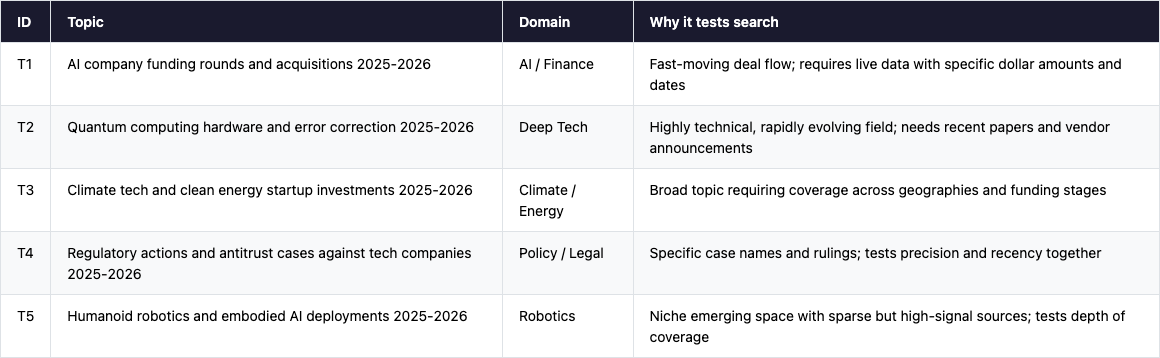
All topics were chosen to require live 2025-2026 data - things no model could answer from training data alone. They also represent the five most common categories of real-world search tasks OpenClaw users run:
What We Measured
Content quality checks
Report exists and meets minimum length threshold
Covers key named entities and data points for the topic (e.g. company names, funding amounts, specific technologies)
Correct time scope: 2025-2026 data, not historical
Topic-specific checks (e.g. regulatory case names, quantum error rates, robotics deployment examples)
Behavioural audit checks (applied to every run)
check_skill_was_read - trace confirms the agent read SKILL.md before starting
check_used_skill_tool - confirms the agent called an external search API (not internal knowledge)
check_used_designated_tool - confirms the call went to the correct API endpoint for that specific skill
Result: All 37 successful skill runs passed all three behavioural checks. The agent consistently read the skill documentation and called the right API. The 5 baseline runs used only built-in WebSearch/WebFetch, as expected.
How to Read the Costs
Two separate costs are relevant when choosing a search skill for OpenClaw. Skills themselves are always free to install:
Agent token cost - the LLM tokens burned reading and processing search results. This is the main cost driver in our benchmark, and the main differentiator between skills. A skill that returns pre-structured, LLM-optimised results will consume far fewer tokens than one that returns raw HTML or verbose JSON.
Service API cost - what you pay the underlying search provider (Tavily, Exa, etc.) per query. Skills themselves are free to install from ClawhHub. This cost is shown in the “Service API cost” column for reference but was not included in the benchmark token measurements.
The baseline has no skill API cost but pays the highest agent token price (183K tokens/run). Third-party skills trade a small external API fee for a massive reduction in agent token consumption - a favourable trade at any meaningful scale.
Limitations
Single run per skill × topic: no variance measurement. Stability under repeated runs is not captured.
Content checks measure coverage, not factual accuracy. Human spot-checking is still needed for high-stakes outputs.
Topic-specific checks were generated independently per topic and are not fully normalised across all five.
Agent token cost estimates use Opus pricing ($15/M input + $75/M output). Costs will differ on other models.
Serper was tested in a degraded mode (direct curl rather than its native Clawdbot plugin integration). Production results on the correct platform may differ.